
LrcMaker
The LRC file format has been around for years
I wasn't happy with any of the tools I found for editing LRC files
Some were too heavy, most were too simple.
So I wrote one, and you can use it for free
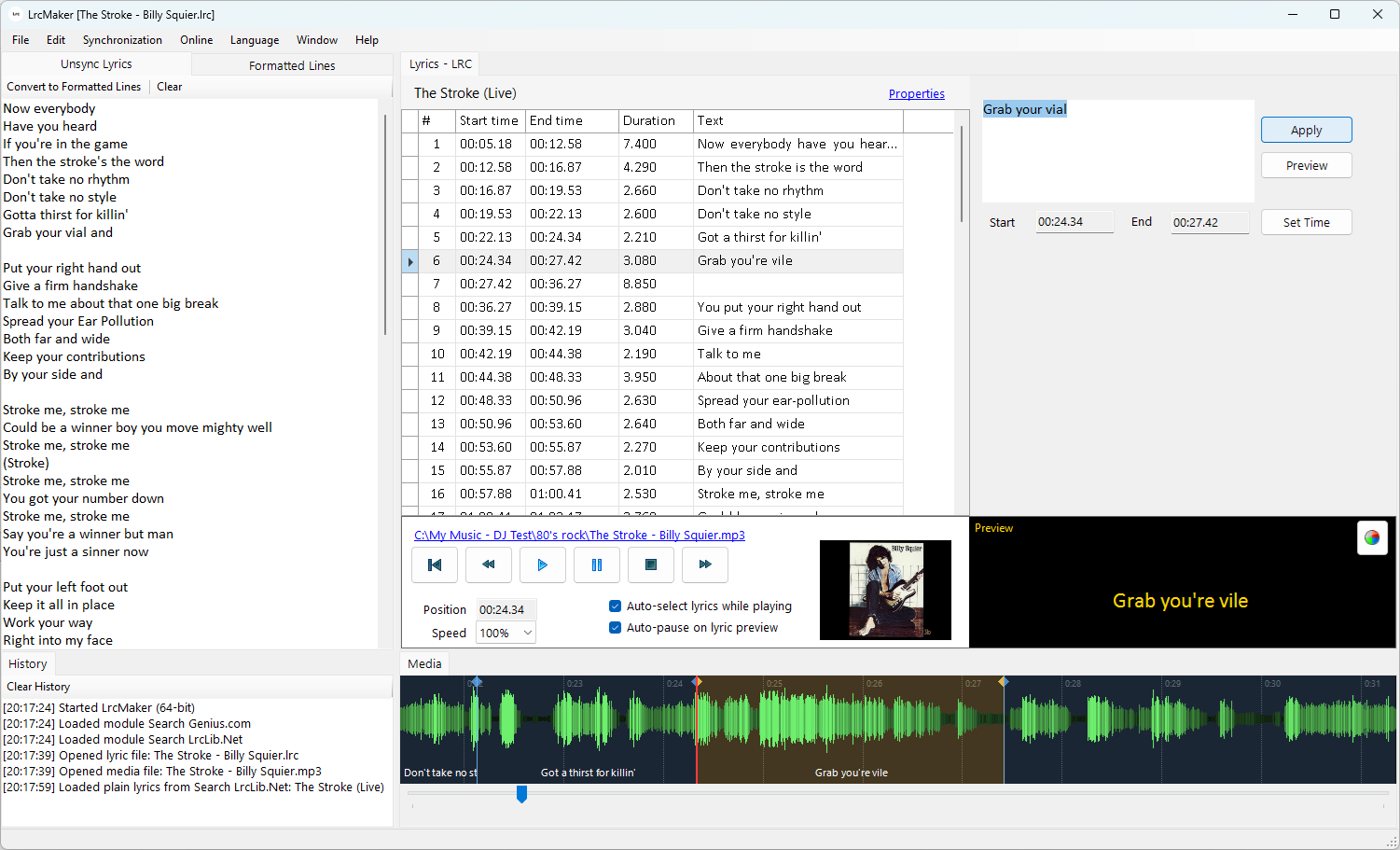
Synchronize Lyrics Easily
LrcMaker provides a clean, native windows interface to import plain text lyrics, convert them into formatted lines, and synchronize them with MP3 audio and other media files. Simply play the audio track and tap or press a key to insert timestamps at the precise moments.
Live preview of lyrics with visual cues
The easy to understand interface visualizes your media file, overlays the lyrics as you edit them, and allows you to make microadjustments to timecodes as necessary.
Online searching for metadata and lyrics
Modular plugins give you the opportunity to search online databases for song metadata and lyrics data when available. Those lyrics can be TXT or LRC format, and you can easily adjust timecodes to match your own files.
Create LRC files
LrcMaker generates clean, fully-compliant LRC files that are compatible with all major audio players and devices supporting synchronized lyrics. You can also easily edit metadata headers like artist, title, and album.
Create eLRC files
LrcMaker also supports the enhanced LRC format. These files have the same LRC extension but include word based timestamp metadata in addition to line based timestamps if that is something you need. Most players and editors choke on eLRC files.